Activity
See who changed what in your workspace and when, whether a person, a hire or Roster itself.
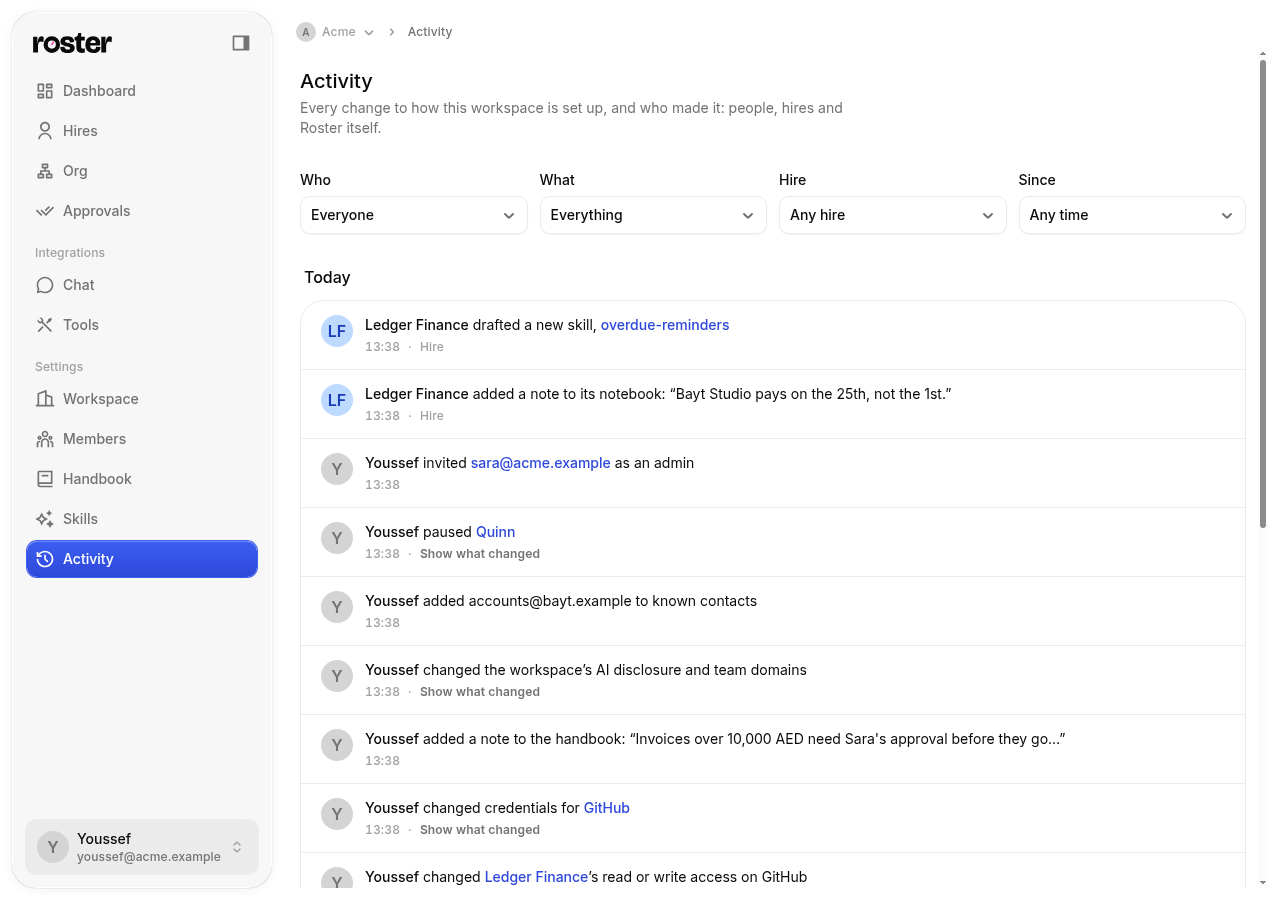
Settings → Activity is the history of how your workspace is set up. Every change is one line, newest first, saying who made it and what they did:
- Youssef renamed Ledger to Ledger Finance
- Ledger added a note to its notebook: “Invoices go out on Fridays”
- Sara gave Ledger access to Xero
- Roster created the workspace Acme
It's separate from timecards, which show the work hires do. Activity shows changes to the setup: hires, what they know, what they can use, and who's on the team.
What's in it
| Area | Changes |
|---|---|
| Hires | Hired, renamed, paused, back to work, let go; instructions, voice, working hours, role and other settings |
| Access | Put on or taken off a chat app; given, changed or removed access to a tool, including read or write and when it asks first; its own GitHub or Slack identity |
| Knowledge | Notes added, edited, pinned or removed in a hire's notebook or the handbook; responsibilities added, changed or removed; follow-ups promised or cancelled; work closed or reopened |
| Skills | Added to the library, drafted by a hire, edited, published, updated from the catalog, removed; turned on or off for a hire |
| Tools | Connected, settings or credentials changed, disconnected |
| Team | Departments, seats and who holds them, goals, approvals decided |
| Workspace | Created or renamed; settings such as AI disclosure, your team's domains and known contacts; people invited, joining, leaving or changing role |
Each line says who made the change:
- A person on your team, in the app or through the API.
- A hire, changing its own notebook, follow-ups or drafted skills while it works.
- Roster itself, for changes nobody made by hand, such as setting up a new workspace.
Changes a person makes through Front Desk ("Front Desk for Ada hired Ledger") or with an API token say so too.
Finding a change
Use the filters at the top:
- Who: everyone, people, hires or Roster.
- What: hires, notes, responsibilities, follow-ups, skills, tools and chat apps, departments, seats, goals, approvals, members, invitations or workspace settings.
- Hire: everything about one hire, whoever made it.
- Since: today, the last 7 days, the last 30 days or any time.
Click a hire, skill or tool in a line to open it. Show what changed lists each changed field before and after, like a hire's instructions or working hours. Credentials never show: a new token reads as changed, not its value. Long text is cut short.
Changes made together, like hiring someone with a role's responsibilities and skills, appear as several lines at the same time.
Who can see it
Only people who manage the workspace (owners, and the role that can invite people; see roles) can open Activity. Others don't see it in Settings.
From the API
The same history is at GET /api/workspaces/:ws/audit, with the same filters: actorType,
actorId, action (one action like hire.renamed, or everything about one kind of thing like
hire), targetType, targetId, from and to. Each change comes with its sentence in
summary. See the API reference.