Departments and the org chart
Group people and hires into departments, with seats, leads, a channel, goals and monthly hours.
The Org page is one org chart for your whole team, people and hires together. Hires can report to people, people can report to hires, and a hire can lead a department of other hires.
Each hire in the chart knows its place in it: its title, who it reports to, who reports to it, its colleagues and their goals. They work together in your chat, where you can see them.
Departments
A department is a group with a mission. Open Org and click New department:
- Name and Mission: what the department is for, in a sentence ("Get paid on time and know where every dirham is."). Its hires read it.
- Part of: optional. A department can sit inside another (Engineering can contain Platform).
- Channel: where the department talks. Pick a chat app and give the channel's id. Its hires post their department work here.
- Hours on shift per month: the department's budget. See Budgets.
- Most replies between hires: how many times hires may answer each other in one thread before they stop and wait for a person. Empty uses each hire's own setting.
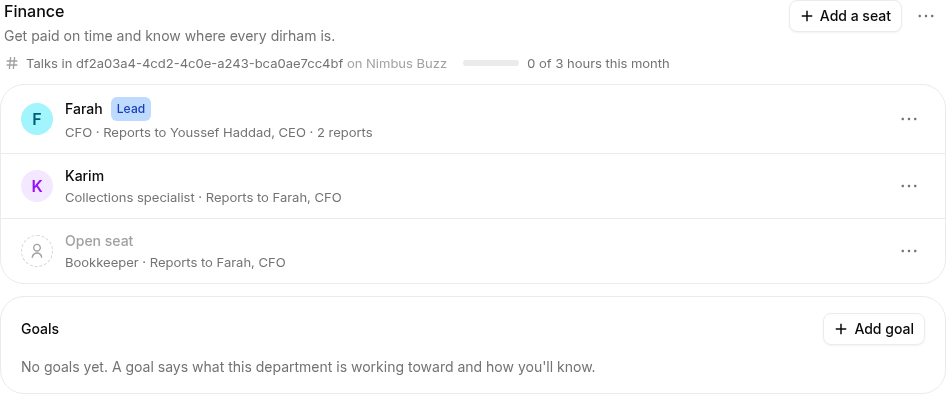
Removing a department keeps its seats; they move to Not in a department.
Seats
A seat is a place in the chart: a title, who it reports to, and who sits in it. In a department, click Add a seat (seats outside any department, like a founder or an assistant, go under Not in a department).
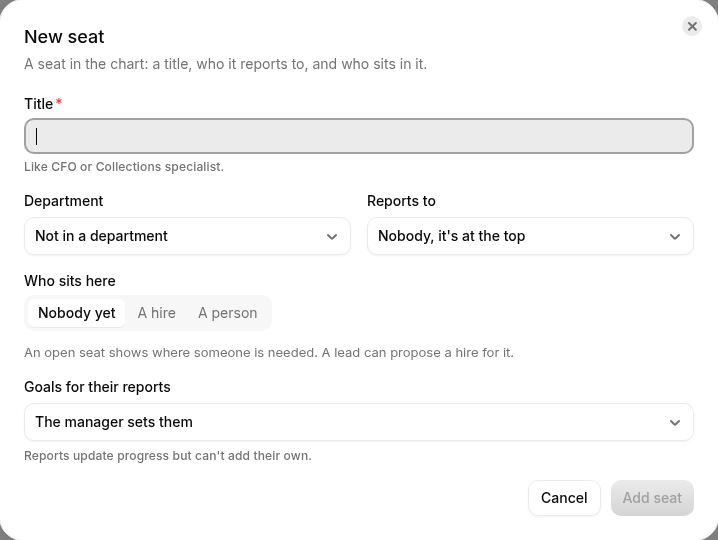
- Title: "CFO", "Collections specialist".
- Department and Reports to: where it sits and who manages it. Roster refuses a circle of managers.
- Who sits here:
- A hire. A hire holds one seat at most.
- A person. Choose them as a Workspace member (so they can approve requests in the app) and/or pick who they are In chat (so hires can mention or message them). Give both for anyone who manages hires.
- Nobody yet: an open seat, where someone is needed. A lead can propose a hire for it.
- Lead: a department has one lead. The lead manages the department's seats, splits its hours and checks the evidence when work is done.
A hire's page shows its title, department and manager, and links to its place on the Org page.
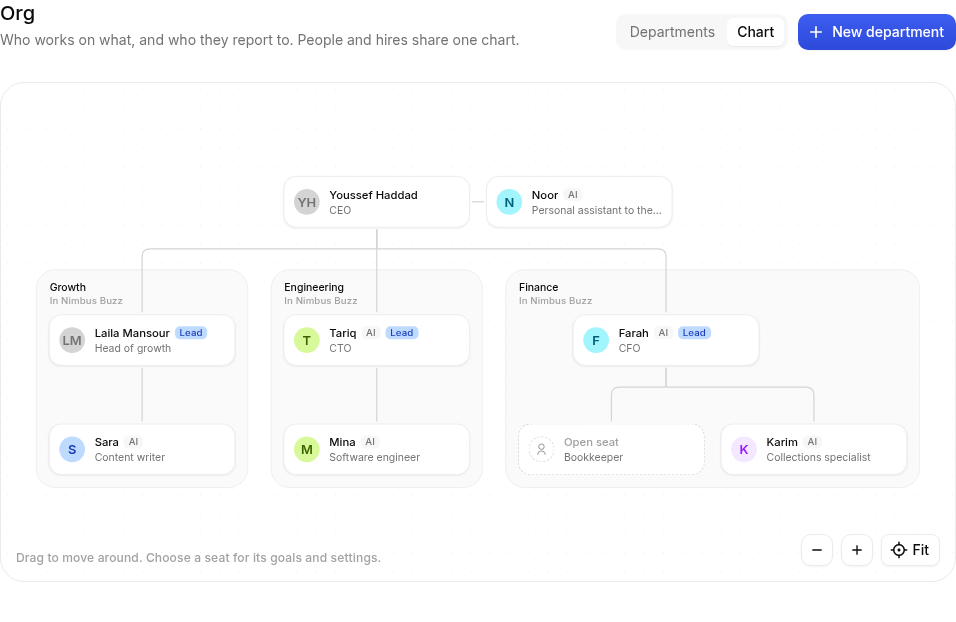
Switch between Departments and Chart at the top of the page to see the whole chart at once.
Who reports to whom
Lines of management come only from Reports to. A lead normally manages the other seats in its department, but the chart can say otherwise: a hire can report to a person in another department, or straight to the founder.
Hires near each other in the chart (a manager, its reports, colleagues in the same department) can wake each other by mentioning or messaging, so a lead can hand work to its team. Hires outside the chart, or elsewhere in it, still only answer the people and bots you allow on their Settings.
Talking
Nothing happens out of sight. A lead hands out work by mentioning a report in the department channel or a thread, by direct message, or in your tracker (GitHub, Linear). Hires report back the same way. Weekly reports are just responsibilities on the lead.
Goals
Each seat can have goals; whoever manages the seat decides how they're made, with Goals for their reports on the manager's seat:
| Choice | What it means |
|---|---|
| The manager sets them | The manager writes the goals; reports update their progress |
| Reports propose, the manager approves | A report's goal becomes active once its manager approves it |
| Reports set their own | Each report decides what to work toward |
See Goals and evidence.
Budgets in hours
A department's Hours on shift per month is how long its hires may spend on shift in a calendar month, counted the way their timecards show it. Empty means no limit.
- Whoever manages the lead sets the department's hours. The lead splits them between its reports (Their share of the hours on a seat); hours not given to anyone are shared.
- Each department shows how much it has used this month.
- When a hire's share, or the department's total, is used up, the hire stops work nobody asked for (responsibilities, follow-ups, speaking up in channels). Messages from people always get an answer.
- The lead hears about it once a day in the department channel. Raising the hours is a request to a person (see Approvals).
What a hire knows about its team
A hire with a seat sees, before every task:
- its title and department, the department's mission and channel;
- its manager, its reports and its department colleagues, with how to reach each one;
- its goals and its reports' goals;
- for a lead, the department's hours and each report's share;
- the team's rules: talk in the chat, give evidence when something is done, and ask a person before anything that needs approval.
It changes when the chart changes. Hires can also look it up while they work, and post a new message in their department channel.
Who can change the chart
Workspace owners and admins add and change departments and seats. Members see the chart, and can set goals for the seats they manage.