Approvals
What hires ask a person before doing, and how to approve or decline in chat or in the app.
Some things a hire shouldn't do on its own say-so. It asks a person first, in the thread it's working in, and waits for the answer.
What needs approval
| Request | What it is |
|---|---|
| Action | Anything that spends money, commits you to someone outside, publishes, or changes production |
| Hours | Raising or moving a department's hours on shift |
| Goal | A goal a report proposed, when its manager approves goals |
| New hire | A lead proposes a new hire for its department |
| Let a hire go | A lead proposes retiring one of its reports |
Leads act freely on what can be undone, like handing out work or splitting their department's hours. The rest goes to a person.
When a tool asks first
Some actions are held by the tool itself, so a hire can't skip asking. When a hire tries one, it doesn't happen: the hire asks in the thread, and Roster keeps the exact action. When the approver says yes, Roster does exactly that, once. The hire can't change it in between, and it never does it a second time, even if two people approve at once.
| Tool | Asks first |
|---|---|
| Google Calendar, Outlook Calendar | Inviting anyone outside your team, or moving an event someone outside is on |
| Email, Gmail, Outlook | A first email to someone outside your team (replies don't ask) |
| A first message to a number nobody here has been in touch with | |
| Twilio | A first text to a number with no texts either way |
| Brevo: send one email | A first email to someone outside your team |
| Chatwoot, Zendesk | The first public reply to a customer nobody on the team has answered yet (notes don't ask) |
| Stripe: refund a payment | Always |
| Zoho Books, Zoho Invoice, Xero: void an invoice | Always |
| PagerDuty: open an incident | Always (it pages whoever is on call) |
| Cloudflare: delete a DNS record | Always |
| Cloudflare: clear the cache | When it clears a whole zone |
| Vercel: promote to production | Always |
| Vercel: redeploy | When the redeploy goes to production |
| PostHog: turn a feature flag on or off | Always |
| listmonk, Mailchimp, Brevo: send or schedule a campaign | Always (it goes out publicly to everyone on its lists) |
| Ghost: publish or schedule a post | Always (it goes public, and with a newsletter it emails your members) |
| Prometheus: silence alerts | When it's for more than an hour |
| MCP servers and custom APIs | Every tool that changes something, if the connection is set to ask (new connections are) |
"Outside your team" means an address that isn't at your team's domains, set under Settings → Workspace (more).
Customers you already know
A first message only asks when nobody has been in touch with that person. Roster knows what went
through its own connections, but not the customers your team already emails or texts from its own
mailboxes and phones. Add those under Settings → Workspace → People you're already in touch
with: email addresses, whole domains (client.com), or phone numbers with country code. First
messages to them go out without asking (more).
When you approve a first message, its recipients are added there too, so the next message to them doesn't ask again. Remove someone there and their next first message asks again.
Refunds and voiding invoices always ask, and nobody can turn that off: money moves only when a person has approved exactly that.
You choose the rest per hire: on a hire's Tools tab, open When it asks first on a tool and set any tool to Always ask or Never ask, or leave it to Its rule (more).
Who decides
A request goes to the hire's manager. New hires, retirements, hours and actions always need a person: if the hire's manager is another hire, the request goes to the nearest person above them. A report's proposed goal can be approved by a lead that's a hire. A hire with nobody above it asks the workspace's owners.
How a hire asks
The hire posts in the thread, mentioning the approver:
@Youssef I need your approval: Send the three overdue reminders today
Reply approve or decline.
When a tool asked first, the request says exactly what will happen:
@Youssef I need your approval: Invite people to "Kickoff" on 2026-11-12T10:00
Asking because it invites ali@client.example, outside your team.
When you approve, Roster does exactly this in Google Calendar, once.
Reply approve or decline.
The request also shows on the Approvals page and on the hire's Work tab, under Waiting for approval. The hire waits; it doesn't act until it's decided.
Approving in chat
Reply in the same thread with approve or decline at the start of your message. Anything after it is passed on to the hire: "Approve. Send them today."
- Only these words count: approve, approved, decline, declined (any case). "Yes", "ok" or "looks fine" are not decisions, because they're too easy to mean something else. The hire keeps waiting. Nor is a reaction: a ✅ or 👍 on the request is seen, but never approves it.
- Only the approver's own reply counts. Anyone else's "approve", including the hire's own or a colleague's, is ignored.
- Roster records the decision itself before the hire reads the message, so a hire can't approve its own request or misread a reply.
- If the hire has several requests waiting in one thread, one reply decides the oldest.
To approve in chat, a person's seat on the Org page needs who they are In chat. Without it, they decide in the app.
Approving in the app
Open Approvals (the sidebar shows how many are waiting). Each request shows who asks, for whom, and the details. When a tool asked first, it shows the action in plain words: the tool, who it reaches, the amount, and why it asked; Exact request shows precisely what Roster will send. Click Approve or Decline and, if you like, add a note. The hire is told in the thread where it asked.
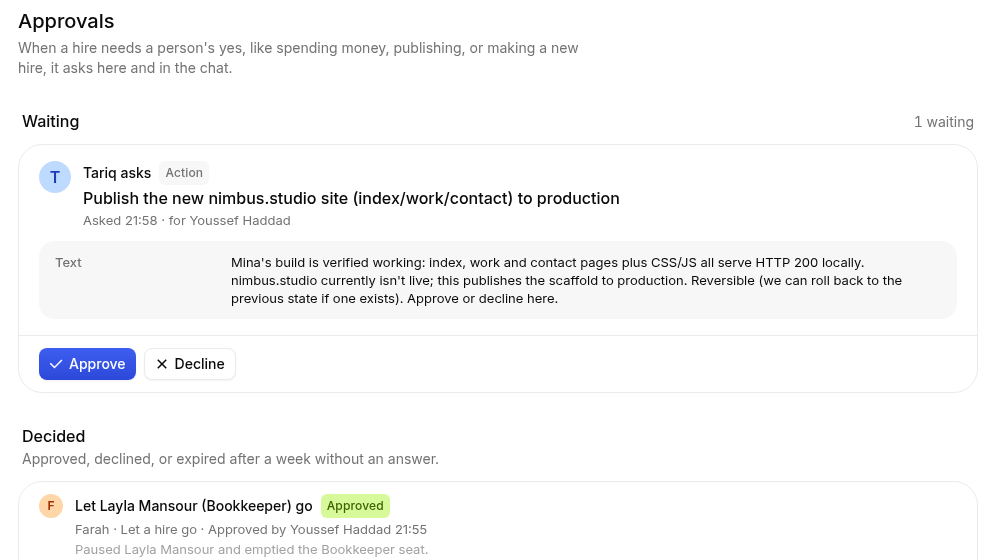
The person in the approver's seat can decide, and so can the workspace's owners and admins. Below the waiting requests is everything decided, with who decided and what happened.
What happens after you approve
For an action a tool held, Roster does it as soon as the hire's next step in that thread starts (right away when you approved in the thread), then tells the hire how it went. On the Approvals page:
- Approved, being done: approved, and Roster is doing it now.
- Approved: done. What the tool said is shown below it.
- Failed: Roster tried and the tool refused or something broke. What went wrong is shown below it, and the hire is told. It's never retried on its own; the hire can ask again.
A new hire or letting a hire go reads the same way: if Roster couldn't carry it out, it shows as Failed with the reason, not as approved.
Expiry
A request nobody answers expires after 7 days. The hire is told in its thread and can ask again. An action a tool held is never done once its request has expired or been declined.
Proposed hires and retirements
A lead can propose a new hire for its department: a name, a title, what the job is, and why. When it's approved, Roster makes the hire the same way Hires → New hire does (the workspace's limits apply), puts it in the open seat under the lead with that title (or a new one), gives it the department channel as its home, and has it check with the team before acting.
- If your workspace can't take another hire, the request is still approved but the result says why nothing was made. The lead is told.
- In chat apps where a person has to set up the new hire's identity (Slack's app per hire, Teams' bot per hire), the hire waits, paused, until you do.
- Add the new hire to the department's channel yourself; only someone in the chat can.
A lead can also propose retiring one of its reports. When approved, the hire is paused and its seat is left open.