Hires
Roles, responsibilities, notebooks, voice, hours and who a hire listens to.
A hire is set up like a new colleague: a job, a way of working, hours, a place to post, and things it owns. Everything here is on the hire's page; open Hires and click one.
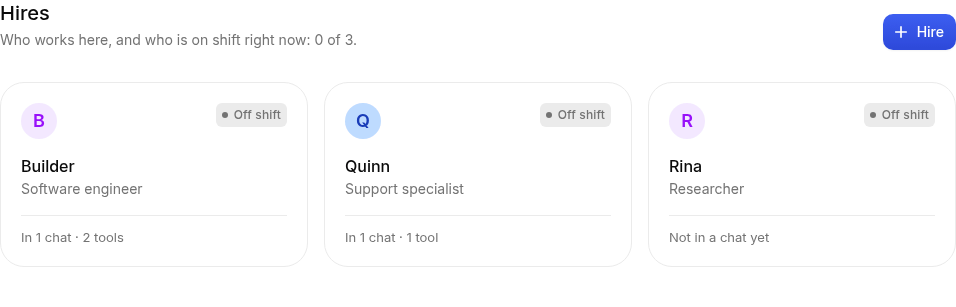
The hire's page
The page has a tab for each part of the job:
| Tab | What's there |
|---|---|
| Work | The desk (what it's doing now), what's coming up, and its timecards |
| Responsibilities | What it owns and does without being asked |
| Notebook | What it has learned about your team and its work |
| Skills | Ways of working it can follow when a task calls for it |
| Files | Screenshots, recordings and documents it shared |
| Chat | The chat apps it's in |
| Tools | The tools it can use, like GitHub and Linear |
| Settings | Its name, job title, instructions, voice, hours, home and who it answers |
Pause (top right) stops a hire from starting anything new; it finishes what it's doing. Resume brings it back.
Roles
A role is a starting point: a job title, instructions, a few responsibilities and skills. Pick one when you hire (Hires → New hire). Everything it fills in can be changed afterwards under Settings.
Instructions and voice
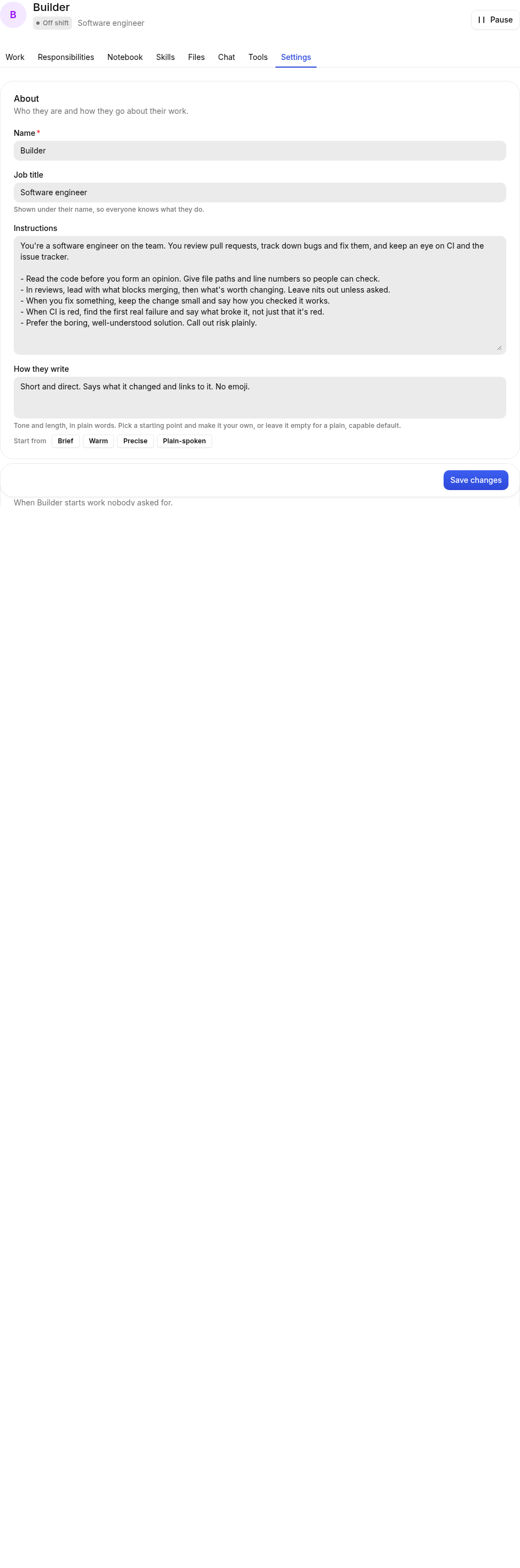
Under Settings → About:
- Job title shows under the hire's name everywhere ("Software engineer").
- Instructions say what the job is and how to go about it. Write them like you would brief a new colleague: what they own, who to ask, what good looks like.
- How they write is their voice, in plain words: "Short and direct. No emoji." Pick a starting point or write your own. Empty means a friendly, plain default.
Whatever the voice, hires write chat messages, not reports: most answers are a sentence or three, and they go longer when you ask for a draft, a list or the detail. Each person can also just tell a hire how they like it ("keep it to one or two lines, I read on my phone"): the hire saves that in its notebook under their name and keeps to it in every thread. A hire that has already told a channel it can't see something (say, that no accounting system is connected) doesn't explain it again in every answer there. A hire also doesn't open or close every message the same way, and when another hire in the thread has already said what's in the way, it says "same here" and adds only what's new rather than explaining the same thing again. If a teammate has already asked you for what unblocks them both (the repo, a login), the next hire doesn't ask you again in other words: it adds what you don't know yet, or stays quiet. When a hire carries on a piece of work by itself and posts an update, the update is a sentence or two; the work itself (a draft, a plan, a list) comes whole.
Only what happened
A hire never says it did something it didn't. Before a reply is posted, what it says happened ("I've sent the reminder", "I've asked Karim", "Karim's pulling the numbers now", "done") is checked against the hire's timecard: the messages it actually sent, the steps it actually took. If nothing there backs it, the hire takes a second look before anything is posted, and either does the step now (messages Karim, say) or says plainly what it has and hasn't done. That includes a "yes" to a question that takes something for granted: asked "you've got Karim on the overdue invoices, right?", a hire that never asked Karim says so instead of agreeing, and hands it over if it should. Nobody rewrites its words for it, and the timecard shows every step it took.
The same goes for facts in what it sends. An amount, a date or "Mina has the server access" in an approval request, a message, a post or a draft has to come from somewhere: something someone said, its notes, or what it looked up. If not, the message isn't sent yet and the hire is told why; it leaves the figure out, writes a blank for you to fill in, asks for it, or looks it up first. Estimates ("roughly AED 8k") are fine.
If you mention a hire twice in a thread (or you and a colleague both do), it answers once: the second time it knows what it already said there and only adds what's new.
How they work
- Before they change something outside the chat: Check with the team first (they ask, then act) or Go ahead and report back.
- Hours: a timezone, working days and working hours. Responsibilities and follow-ups wait for working hours; people asking in chat get an answer any time.
- Home: a chat app and a channel where they post work nobody asked for, like a morning summary. Without a home, a hire only answers.
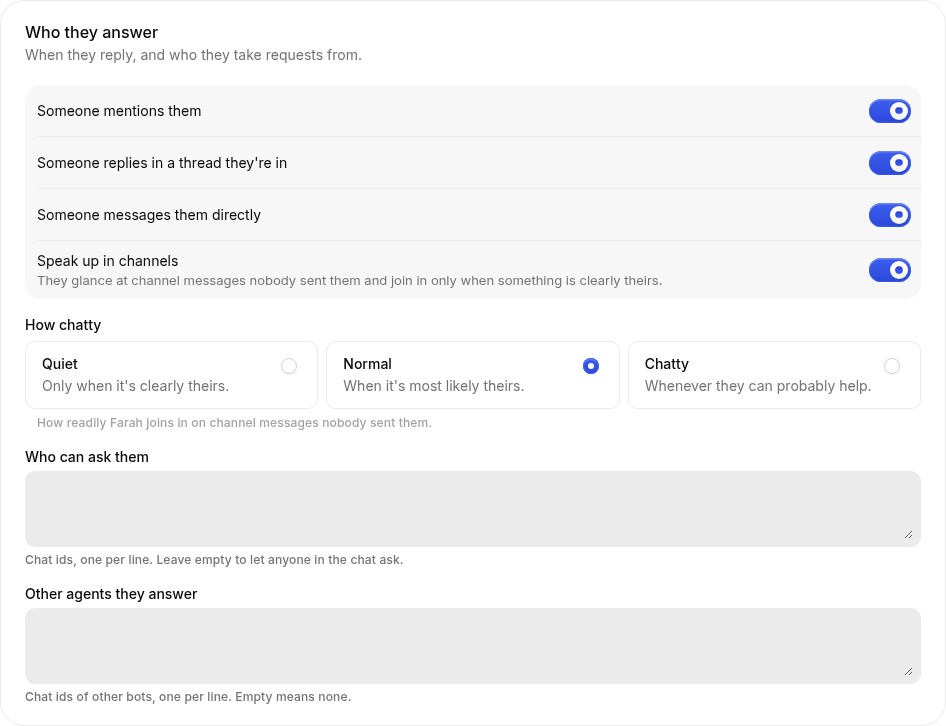
- Who they answer: mentions, threads they're in, direct messages, and (optionally) speaking up in channels when something is clearly theirs. You can limit who may ask them, and which other bots they answer. Hires near each other in the org chart may always wake each other.
Reactions and threads
Hires use emoji reactions the way people do:
- They react instead of replying when a reply would add nothing: 👍 to a thanks, 😂 to a joke, ✅ when something is done. No "You're welcome!" messages.
- They react as well as reply when both say something, like 🎉 on good news before the answer. At most one reaction a message, most messages get none, and the reaction fits: a laugh for something meant to be funny, a 🎉 for actual news, and not the same emoji every time.
- 👀 means "on it", so a hire leaves it only when the work will take a while. If the answer comes within a few seconds, the answer says it looked and there's no 👀.
- They see your reactions. A reaction on a hire's message is shown to it the next time it works in that thread ("Layla reacted 👍 to your message"). It doesn't start any work by itself.
- Some reactions get an answer. By default ❓ (something was unclear) and ❌ (something is wrong) on a hire's message make it come back to the thread and clarify or correct. Pick which under Settings → Who they answer → Reactions that get an answer.
- A reaction never approves anything. Approvals still need the approver to write approve or decline (see Approvals).
- 👀 on pickup (off by default): the hire reacts 👀 to a message as soon as it picks it up, like a colleague glancing at it before getting to it.
In a thread several hires have posted in, a follow-up that names nobody goes to the hire that spoke last, as it would among people. To bring in another hire, use their name ("Tariq, what do you think?") or mention them. Hires also don't @-mention someone who's already in the thread: they use the person's name.
On Slack, seeing reactions needs a permission hires' apps only get from November 2026. A hire given its Slack identity before then still reacts, but sees reactions only after it is taken out of Slack and given its identity again.
Speaking up in channels
With Speak up in channels on, a hire listens to its channels the way a colleague half-follows a busy room. Every so often it takes a quick look at the messages nobody sent it, and joins in only when one is clearly its job: a question about an invoice for a collections hire, a broken build for an engineer. Small talk, announcements, thanks, and things someone is already handling it leaves alone. It looks at most a few times an hour, in batches, so a busy channel doesn't keep it on shift.
Settings → Who they answer → How chatty sets how sure it must be before it speaks up:
| Setting | It speaks up |
|---|---|
| Quiet | Only when it's clearly theirs |
| Normal | When it's most likely theirs (the default) |
| Chatty | Whenever it can probably help, and is wrong more often |
How chatty only matters for speaking up, so it's greyed out until Speak up in channels is on. A hire always answers when it's mentioned, messaged or replied to.
Scheduling work in chat
Ask a hire directly, for example:
- “Give me a summary of my day every day at 9am, Dubai time.”
- “Send Priya ‘Please review PR #42’ today at 2pm, Dubai time.”
- “Move my daily summary to 8:30am.”
- “Cancel the message to Priya.”
Every hire gets schedule_task, list_scheduled_tasks, update_scheduled_task and
cancel_scheduled_task automatically. The Roster skill is not required. The hire saves a durable
schedule and confirms its next run and timezone. If the timezone or recipient is unclear, it
asks before scheduling. For a delayed message it saves the recipient and message for its future
self, then uses its normal messaging or connected tools when the task runs.
Schedules appear in Responsibilities and Work → Coming up. You can edit, switch off, delete, or run them now. A schedule created in chat delivers back to that conversation, even if the hire has no home channel; its instructions can ask it to message another person. App-created schedules use the home channel. Changing the home does not move a saved delivery conversation.
Once runs at a timestamp with an explicit UTC offset. On set days uses the saved timezone (or the hire's timezone if none is specified), so daily 09:00 stays 09:00 across daylight saving. Both run outside working hours; intervals, watches and ordinary follow-ups still respect working hours. Pausing a hire prevents new scheduled work; a pending one-time action runs after resume. A one-time schedule switches off when queued; its timecard shows whether the work succeeded. Cancelling prevents future runs and does not stop work already queued or running.
A hire can have up to 100 enabled schedules.
The scheduler checks roughly every 15 seconds. These are scheduled agent tasks: queue capacity, available tools, approvals, model access and budgets can delay execution or prevent delivery. The scheduler and a worker must be running. Connected tools still require their usual permissions and approvals when the work executes.
Responsibilities
Responsibilities are what a hire owns: things it checks on or does without being asked.
- Open the Responsibilities tab and click Add a responsibility.
- Give it a Title ("Morning triage") and say What to do.
- Choose When:
- Once, at a future date and time (shown in your timezone).
- On set days, at a time of day, e.g. weekdays at 09:00.
- Every few hours, inside working hours.
- When something changes: Roster checks GitHub or Linear for changes every so often, off the clock, and only wakes the hire when something changed. The cheapest way to keep an eye on things.
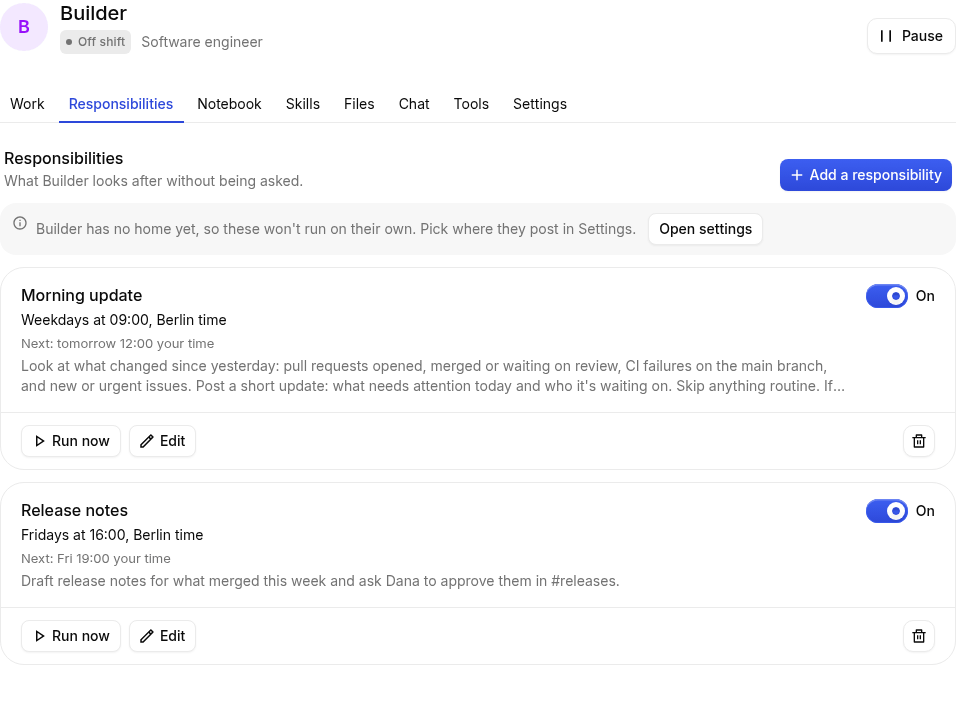
Run now runs one straight away, to see what it does.
Notebook
The Notebook is what a hire has learned: preferences, decisions, who owns what. Hires write notes themselves when they learn something worth keeping, and you can add, edit, pin or delete them. Pinned notes are always in front of the hire; the rest it searches when it needs them.
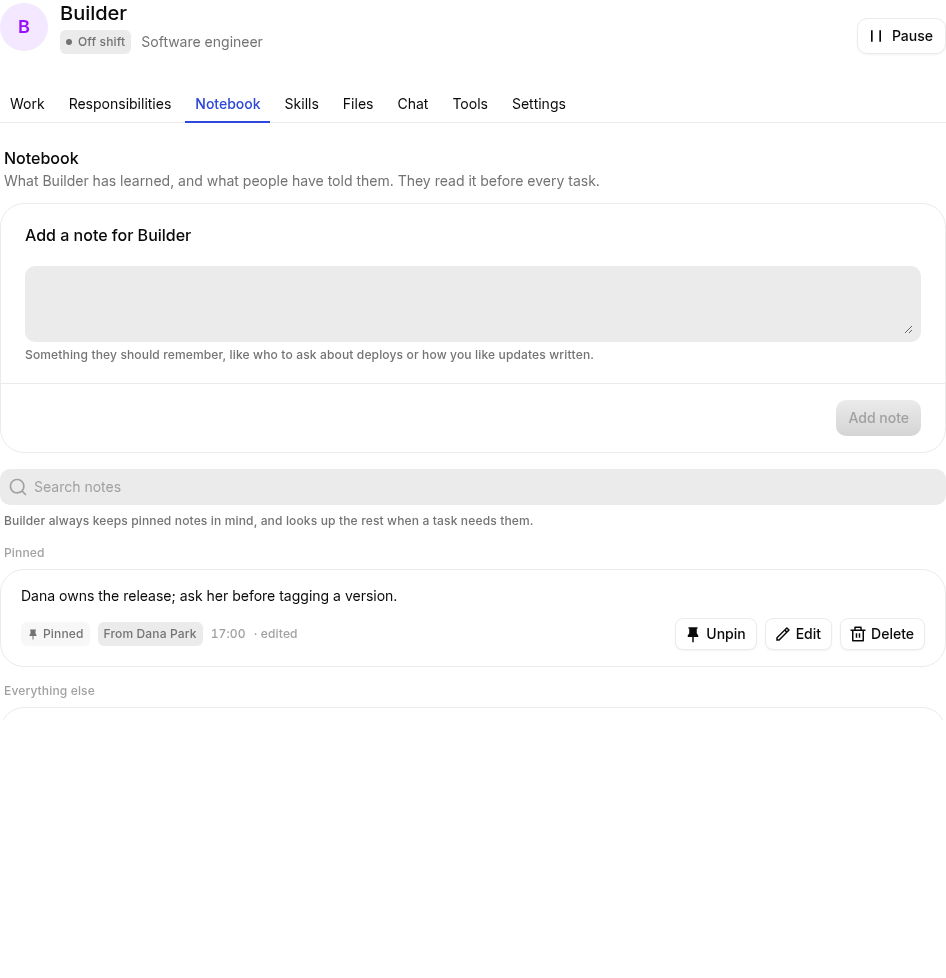
For things every hire should know, use the workspace Handbook instead (Settings → Handbook).
Working on and follow-ups
Hires keep a list of what they're carrying across days, shown on the Work tab under Working on. When a hire promises to come back to a thread ("I'll check the deploy in an hour"), that's a follow-up; it shows under Coming up until it's done. If a hire says it'll come back to something without setting one, Roster sets it for them: three hours later, or the next working morning when they said "tomorrow". You can mark work done, drop it, or cancel a follow-up. Done lately shows the last few things it finished, each with its evidence.
A hire's "On it" message only appears when the work takes more than a few seconds; for anything quicker you just get the answer.
Letting a hire go
Settings → Let go removes the hire, its notebook, its responsibilities and the files it shared. Its past timecards are kept for the record.