GitHub
Let hires read and work on pull requests, issues, files and CI, as themselves or with a shared token.
Explore 8 actions and their permissionsExact inputs, sign-in scopes, access limits and approval rules.
With GitHub, a hire can list and read pull requests and issues, read files, check CI, comment, and open issues. There are two ways to connect it:
| Way | Takes | Hires show on GitHub as | Best for |
|---|---|---|---|
| Its own GitHub identity | Two clicks | Themselves, e.g. builder-acme[bot] | Most teams (recommended) |
| A shared token | A minute | Whoever made the token | Trying Roster out |
Either way, GitHub's side is the ceiling: a hire can never do more than the token or app allows, on more repositories than it can reach. Within that, Roster lets you narrow each hire further (see What each hire may do).
Its own GitHub identity
Each hire gets a GitHub App of its own, named after it and your workspace (e.g.
builder-acme). Its comments, issues and pushes show as builder-acme[bot], it has its own rate
limit, and GitHub's audit log tells it apart from people and other hires. Roster never hands
the hire a long-lived credential: it makes one-hour tokens as needed.
Before you start, add a GitHub connection under Integrations → Tools (a shared token is optional when every hire has its own identity) and give the hire GitHub on its Tools tab. For an organisation, you need to be able to create apps for it (an organisation owner, or a GitHub App manager); otherwise GitHub asks an owner to approve the install.
- Open the hire's page, then its Tools tab, and click
Give name its own GitHub identity.
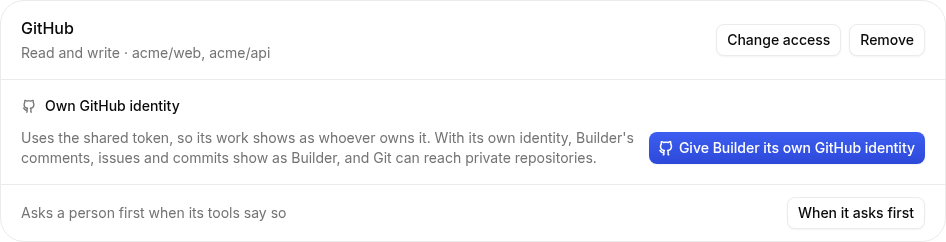
The hire's Tools tab with GitHub - Choose Where it lives: My GitHub account (for repositories you own yourself) or An organization (type its name). Continue to GitHub.
- GitHub opens with the app filled in: its name, picture and the permissions below. Click
Create GitHub App.
Screenshot coming soonGitHub's "Create GitHub App" screen from the manifest; capture by hand on a test organisation.
GitHub creating the hire's app - GitHub asks where to install it. Choose Only select repositories, pick the ones this hire
works on, and click Install.
Screenshot coming soonGitHub's install screen with "Only select repositories"; capture by hand.
Choosing the hire's repositories - GitHub sends you back to Roster, which shows the hire's GitHub name and the repositories it
can reach.
Screenshot coming soonThe Tools tab once the hire's app is installed (e.g. builder-acme[bot] and its repositories). Needs a real GitHub App install.
The hire with its own GitHub identity
If GitHub says the name is taken, use another name and try again. To add or remove repositories later, use Manage on GitHub next to the identity. Remove identity takes it away in Roster; to delete the app itself, open it on GitHub and choose Delete GitHub App.
Permissions the hire's app asks for
| Permission | Read-only hire | Read and write hire | Why |
|---|---|---|---|
| Metadata | Read | Read | GitHub requires it for every app: lets the hire see the repositories exist |
| Contents | Read | Read and write | Read files; with write, push branches with Git |
| Issues | Read | Read and write | Read issues and their comments; with write, comment and open issues |
| Pull requests | Read | Read and write | Read pull requests and their changed files; with write, comment on them |
| Checks | Read | Read | See check results on a pull request |
| Actions | Read | Read | List workflow runs, to check CI |
The app asks for no webhooks and no organisation or account permissions.
Note
GitHub Apps can't be assigned issues or asked for reviews. If a hire must be assignable, make a separate GitHub account for it (a "machine user"), give that account access to the repositories, and connect it with its own token as a separate GitHub connection used only by that hire.
Git, as the hire
With its own identity, a hire can clone and push repositories it's allowed to, as itself. Inside its sandbox, Git asks Roster for a token for one repository at a time; Roster checks the hire's access and gives it a short-lived token scoped to that repository. Nothing long-lived ever reaches the sandbox. Commits are authored by the hire's bot.
A shared token
The quick way: one token for the workspace. Every hire using it shows on GitHub as the token's owner and shares its rate limit (5,000 requests an hour).
1. Make a fine-grained token on GitHub
- Open GitHub's new fine-grained token page, filled in for Roster (the form in Roster links there too). The name and the permissions in the table below are already set.
- Expiration: as long as your policy allows; you'll paste a new one when it expires.
- Resource owner: your organisation (it may need an owner to approve the token).
- Repository access: Only select repositories, then pick the ones hires work on.
- Permissions: check they match the table below, and nothing else.
- Click Generate token and copy it (it starts with
github_pat_, orghp_for a classic token). Roster tells you at once if what you paste doesn't look like a GitHub token.
| Permission | Access | Why |
|---|---|---|
| Metadata | Read | Required by GitHub for every token |
| Contents | Read | Read files at a branch, tag or commit |
| Issues | Read and write | Read issues; comment and open new ones |
| Pull requests | Read and write | Read pull requests and changed files; comment on them |
| Checks | Read | See check results on a pull request |
| Actions | Read | List workflow runs, to check CI |
| Commit statuses | Read | Optional: CI systems that report statuses instead of checks |
Prefer read only? Give Issues and Pull requests Read only; hires then can't comment or open issues, and they'll say so instead.
Careful
A classic token works too (scope repo, or public_repo for public repositories only), but it
reaches every repository you can, with more rights than hires need. Use a fine-grained token.
2. Add it to Roster
- Open Integrations → Tools and click Add a tool, then GitHub.
- Paste the token into Access token. Leave API address empty unless you use GitHub
Enterprise Server (then it's
https://github.example.com/api/v3). - Click Connect. Roster asks GitHub who the token belongs to, and the connection shows Connected as that GitHub user. If GitHub refuses the token, Roster says so and saves nothing.
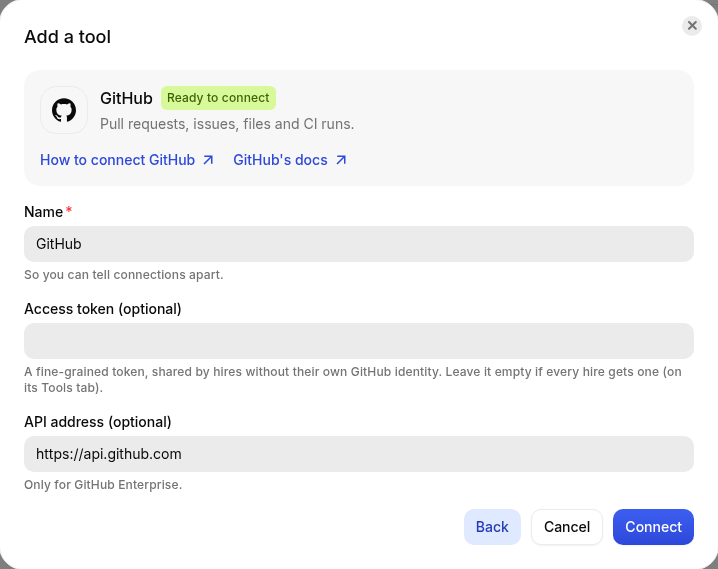
Roster seals the token and never shows it again. To replace it, click Change on the connection.
What each hire may do
On the hire's Tools tab, add GitHub (or click Change access on it) and choose:
- Repositories:
owner/name, one per line. The hire can only use these, checked on every call. Empty means every repository the token or app can reach. - What they can do: Read only (list and read; it can't comment, open issues or push) or Read and write.
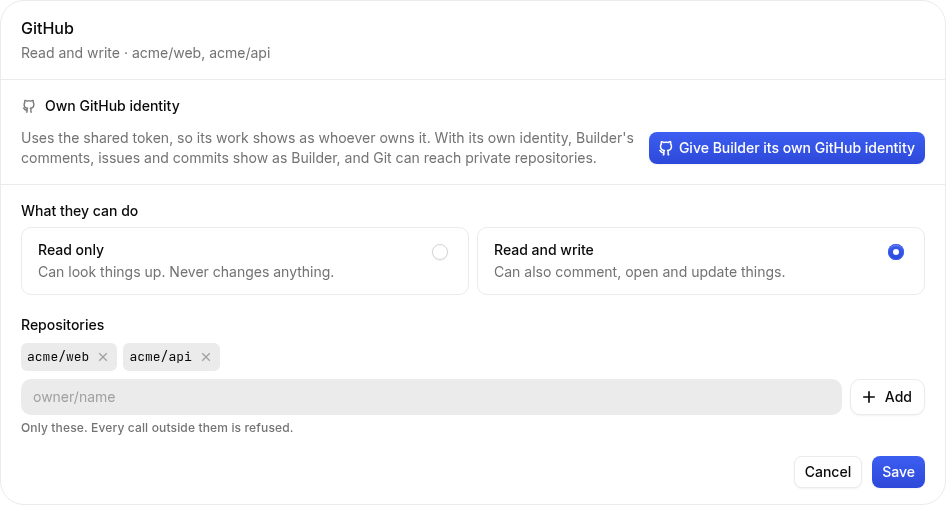
A hire refused something gets a plain error and tells the person who asked.
What hires can do with GitHub
| They can | Needs |
|---|---|
| List pull requests, read one with its files and checks | Read |
| List issues, read one with its comments | Read |
| Read a file at a branch, tag or commit | Read |
| List CI runs, filter by branch or failures | Read |
| Comment on an issue or pull request | Read and write |
| Open an issue | Read and write |
A responsibility can also watch GitHub: Roster checks for updated issues and pull requests on its own, off the clock, and wakes the hire only when something changed (see Responsibilities).
Tools and permissions reference
This reference is built from the same definitions Roster uses to connect GitHub and give hires access. It updates with each release.
Authentication and requested permissions
The account or app you connect sets the outer limit. Each hire's access can narrow it further. Connecting a tool gives it to no hire until you give access on that hire's Tools tab.
API key or access token
A fine-grained token, shared by hires without their own GitHub identity. Leave it empty if every hire gets one (on its Tools tab).
When making a key, use these permissions from the connection guide:
- Contents: Read
- Issues: Read and write
- Pull requests: Read and write
- Checks: Read
- Actions: Read
- Commit statuses: Read
Connection fields
| Field | What to provide |
|---|---|
Access tokentokenOptional · sealed secret | A fine-grained token, shared by hires without their own GitHub identity. Leave it empty if every hire gets one (on its Tools tab). |
API addressapiUrlOptional | Only for GitHub Enterprise. Starts with: |
Per-hire limits
Read-only hires receive only actions that read. Read-and-write access also allows actions that change things, where the connection itself permits them. An empty resource allowlist usually means everything the connected account can reach; each field below explains its meaning.
| Field | What to provide |
|---|---|
RepositoriesreposOptional | owner/name, one per line. Leave empty for every repository the token can reach. |
Actions
8 actions: 6 only read and 2 change something. A read action may still need approval when your workspace or hire is set to ask. A locked approval requirement always applies.
8 of 8 actions. Open an action for its arguments and full input schema.
list_pull_requestsRead only
List pull requests in a repo, newest activity first.
Approval: Uses your workspace and hire approval settings.
| Argument | Type | Details |
|---|---|---|
repoRequired | string | owner/name |
stateOptional | "open" | "closed" | "all" | See input schema below.Default: "open" |
Full input schema (JSON)
{
  "$schema": "http://json-schema.org/draft-07/schema#",
  "type": "object",
  "properties": {
    "repo": {
      "type": "string",
      "pattern": "^(?!\\.{1,2}\\/)[\\w.-]+\\/(?!\\.{1,2}$)[\\w.-]+$",
      "description": "owner/name"
    },
    "state": {
      "default": "open",
      "type": "string",
      "enum": [
        "open",
        "closed",
        "all"
      ]
    }
  },
  "required": [
    "repo"
  ]
}get_pull_requestRead only
A pull request's description, changed files and check results.
Approval: Uses your workspace and hire approval settings.
| Argument | Type | Details |
|---|---|---|
repoRequired | string | owner/name |
numberRequired | integer | See input schema below. |
Full input schema (JSON)
{
  "$schema": "http://json-schema.org/draft-07/schema#",
  "type": "object",
  "properties": {
    "repo": {
      "type": "string",
      "pattern": "^(?!\\.{1,2}\\/)[\\w.-]+\\/(?!\\.{1,2}$)[\\w.-]+$",
      "description": "owner/name"
    },
    "number": {
      "type": "integer",
      "exclusiveMinimum": 0,
      "maximum": 9007199254740991
    }
  },
  "required": [
    "repo",
    "number"
  ]
}list_issuesRead only
List issues (not pull requests) in a repo, newest activity first.
Approval: Uses your workspace and hire approval settings.
| Argument | Type | Details |
|---|---|---|
repoRequired | string | owner/name |
stateOptional | "open" | "closed" | "all" | See input schema below.Default: "open" |
labelsOptional | string | comma-separated |
Full input schema (JSON)
{
  "$schema": "http://json-schema.org/draft-07/schema#",
  "type": "object",
  "properties": {
    "repo": {
      "type": "string",
      "pattern": "^(?!\\.{1,2}\\/)[\\w.-]+\\/(?!\\.{1,2}$)[\\w.-]+$",
      "description": "owner/name"
    },
    "state": {
      "default": "open",
      "type": "string",
      "enum": [
        "open",
        "closed",
        "all"
      ]
    },
    "labels": {
      "description": "comma-separated",
      "type": "string"
    }
  },
  "required": [
    "repo"
  ]
}get_issueRead only
An issue or pull request's description and its latest comments.
Approval: Uses your workspace and hire approval settings.
| Argument | Type | Details |
|---|---|---|
repoRequired | string | owner/name |
numberRequired | integer | See input schema below. |
Full input schema (JSON)
{
  "$schema": "http://json-schema.org/draft-07/schema#",
  "type": "object",
  "properties": {
    "repo": {
      "type": "string",
      "pattern": "^(?!\\.{1,2}\\/)[\\w.-]+\\/(?!\\.{1,2}$)[\\w.-]+$",
      "description": "owner/name"
    },
    "number": {
      "type": "integer",
      "exclusiveMinimum": 0,
      "maximum": 9007199254740991
    }
  },
  "required": [
    "repo",
    "number"
  ]
}get_fileRead only
Read a file from a repo at a branch, tag or commit (default branch if omitted).
Approval: Uses your workspace and hire approval settings.
| Argument | Type | Details |
|---|---|---|
repoRequired | string | owner/name |
pathRequired | string | See input schema below. |
refOptional | string | See input schema below. |
Full input schema (JSON)
{
  "$schema": "http://json-schema.org/draft-07/schema#",
  "type": "object",
  "properties": {
    "repo": {
      "type": "string",
      "pattern": "^(?!\\.{1,2}\\/)[\\w.-]+\\/(?!\\.{1,2}$)[\\w.-]+$",
      "description": "owner/name"
    },
    "path": {
      "type": "string",
      "minLength": 1
    },
    "ref": {
      "type": "string"
    }
  },
  "required": [
    "repo",
    "path"
  ]
}list_workflow_runsRead only
Recent GitHub Actions runs, to check CI. Filter by branch or status (e.g. failure).
Approval: Uses your workspace and hire approval settings.
| Argument | Type | Details |
|---|---|---|
repoRequired | string | owner/name |
branchOptional | string | See input schema below. |
statusOptional | string | See input schema below. |
Full input schema (JSON)
{
  "$schema": "http://json-schema.org/draft-07/schema#",
  "type": "object",
  "properties": {
    "repo": {
      "type": "string",
      "pattern": "^(?!\\.{1,2}\\/)[\\w.-]+\\/(?!\\.{1,2}$)[\\w.-]+$",
      "description": "owner/name"
    },
    "branch": {
      "type": "string"
    },
    "status": {
      "type": "string"
    }
  },
  "required": [
    "repo"
  ]
}commentRead and write
Comment on an issue or pull request.
Approval: Uses your workspace and hire approval settings.
| Argument | Type | Details |
|---|---|---|
repoRequired | string | owner/name |
numberRequired | integer | See input schema below. |
bodyRequired | string | See input schema below. |
Full input schema (JSON)
{
  "$schema": "http://json-schema.org/draft-07/schema#",
  "type": "object",
  "properties": {
    "repo": {
      "type": "string",
      "pattern": "^(?!\\.{1,2}\\/)[\\w.-]+\\/(?!\\.{1,2}$)[\\w.-]+$",
      "description": "owner/name"
    },
    "number": {
      "type": "integer",
      "exclusiveMinimum": 0,
      "maximum": 9007199254740991
    },
    "body": {
      "type": "string",
      "minLength": 1
    }
  },
  "required": [
    "repo",
    "number",
    "body"
  ]
}create_issueRead and write
Open a new issue.
Approval: Uses your workspace and hire approval settings.
| Argument | Type | Details |
|---|---|---|
repoRequired | string | owner/name |
titleRequired | string | See input schema below. |
bodyOptional | string | See input schema below.Default: "" |
labelsOptional | string[] | See input schema below.Default: [] |
Full input schema (JSON)
{
  "$schema": "http://json-schema.org/draft-07/schema#",
  "type": "object",
  "properties": {
    "repo": {
      "type": "string",
      "pattern": "^(?!\\.{1,2}\\/)[\\w.-]+\\/(?!\\.{1,2}$)[\\w.-]+$",
      "description": "owner/name"
    },
    "title": {
      "type": "string",
      "minLength": 1
    },
    "body": {
      "default": "",
      "type": "string"
    },
    "labels": {
      "default": [],
      "type": "array",
      "items": {
        "type": "string"
      }
    }
  },
  "required": [
    "repo",
    "title"
  ]
}
Watches and incoming events
- This integration supports a responsibility that watches for changes. The guide above explains what it checks and how to limit it.
- No incoming webhook handler is declared for this integration.
Limits and troubleshooting
- Permission errors: check both the connected account's rights and the hire's resource and read/write limits.
- Expired or revoked access: reconnect or replace the key on the connection.
- Rate limits and unavailable services can interrupt work. The hire's timecard records the outcome.
- The action schema describes accepted inputs. It does not grant additional access or bypass approvals.