Plane
Let hires find, create, update and comment on work items and plan cycles in Plane, on Plane Cloud or your own server.
Explore 9 actions and their permissionsExact inputs, sign-in scopes, access limits and approval rules.
With Plane (open source), a hire can list your projects, search and list work items, read one with its comments, create work items, change their name, description, state or priority, comment, see cycles and add work items to a cycle. It works the same on Plane Cloud and on a Plane you run yourself.
1. Make an API key in Plane
- Open Personal access tokens in Plane Cloud (the form in Roster links there too). If you run Plane yourself, it's the same page on your Plane: Profile settings → Personal access tokens.
- Click Add personal access token, name it
Rosterand copy the token.
What hires do shows as the token's owner, so you may want a Plane member just for Roster.
2. Connect it in Roster
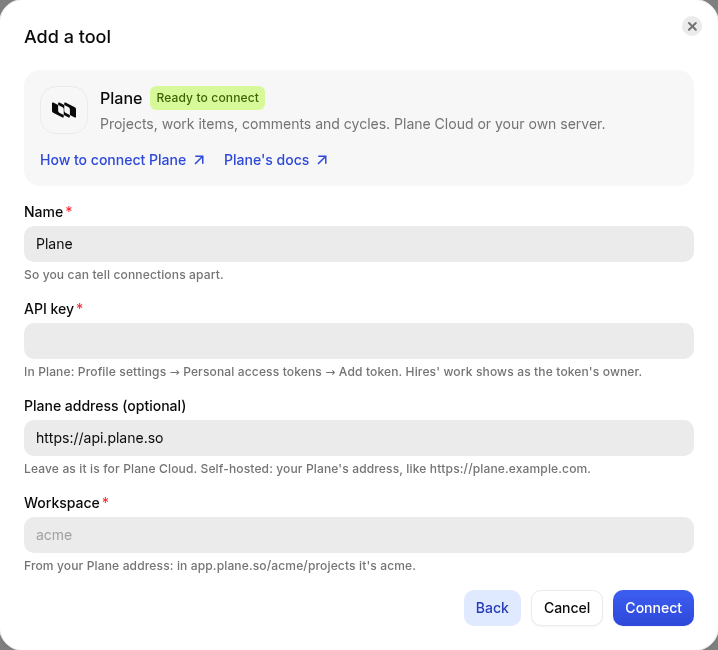
- Open Integrations → Tools → Add a tool, search for Plane and choose it.
- API key: paste the token.
- Plane address: leave
https://api.plane.sofor Plane Cloud. If you run Plane yourself, put your Plane's address, likehttps://plane.example.com. - Workspace: your workspace's slug, from your Plane address. In
app.plane.so/acme/projects/it'sacme. - Click Connect. Roster checks the key on your workspace's projects, and the connection shows Connected as acme (your workspace). If Plane refuses the key, or the workspace doesn't exist, Roster says so and saves nothing.
3. Give hires access
On the hire's Tools tab, click Give access on Plane:
- Read only: it can list, search and read work items and cycles, and nothing else.
- Read and write: it can also create and update work items, comment and add them to cycles.
- Projects: project identifiers like
WEB. Leave it empty for every project the key can reach. Anything outside the list is refused.

Hires refer to work items by their key, like WEB-12, and to states and cycles by name, so they
can say "moved WEB-12 to In Progress" the way your team does.
Watching for changes
With projects listed, a hire's responsibility can watch Plane: when work items in those projects change, the hire is woken with the list. Checking costs nothing when nothing changed.
Tools and permissions reference
This reference is built from the same definitions Roster uses to connect Plane and give hires access. It updates with each release.
Authentication and requested permissions
The account or app you connect sets the outer limit. Each hire's access can narrow it further. Connecting a tool gives it to no hire until you give access on that hire's Tools tab.
API key or access token
In Plane: Profile settings → Personal access tokens → Add token. Hires' work shows as the token's owner.
No fixed permission list is declared for this connection. Review the sign-in consent screen, the account's roles, and the service's own documentation before connecting.
Connection fields
| Field | What to provide |
|---|---|
API keyapiKeyRequired · sealed secret | In Plane: Profile settings → Personal access tokens → Add token. Hires' work shows as the token's owner. |
Plane addressurlOptional | Leave as it is for Plane Cloud. Self-hosted: your Plane's address, like https://plane.example.com. Starts with: |
WorkspaceworkspaceRequired | From your Plane address: in app.plane.so/acme/projects it's acme. |
Per-hire limits
Read-only hires receive only actions that read. Read-and-write access also allows actions that change things, where the connection itself permits them. An empty resource allowlist usually means everything the connected account can reach; each field below explains its meaning.
| Field | What to provide |
|---|---|
ProjectsprojectsOptional | Project identifiers like WEB. Leave empty for every project the key can reach. |
Actions
9 actions: 5 only read and 4 change something. A read action may still need approval when your workspace or hire is set to ask. A locked approval requirement always applies.
9 of 9 actions. Open an action for its arguments and full input schema.
list_projectsRead only
The Plane projects this hire can use, with their identifiers.
Approval: Uses your workspace and hire approval settings.
This action takes no arguments.
Full input schema (JSON)
{
  "$schema": "http://json-schema.org/draft-07/schema#",
  "type": "object",
  "properties": {}
}search_work_itemsRead only
Search work items by words in their name or by key. Up to 20 matches.
Approval: Uses your workspace and hire approval settings.
| Argument | Type | Details |
|---|---|---|
queryRequired | string | See input schema below. |
Full input schema (JSON)
{
  "$schema": "http://json-schema.org/draft-07/schema#",
  "type": "object",
  "properties": {
    "query": {
      "type": "string",
      "minLength": 1
    }
  },
  "required": [
    "query"
  ]
}list_work_itemsRead only
A project's work items, most recently updated first, optionally only those in one state.
Approval: Uses your workspace and hire approval settings.
| Argument | Type | Details |
|---|---|---|
projectRequired | string | project identifier, e.g. WEB |
stateOptional | string | only items in this state, e.g. In Progress |
limitOptional | integer | See input schema below.Default: 30 |
Full input schema (JSON)
{
  "$schema": "http://json-schema.org/draft-07/schema#",
  "type": "object",
  "properties": {
    "project": {
      "type": "string",
      "minLength": 1,
      "description": "project identifier, e.g. WEB"
    },
    "state": {
      "description": "only items in this state, e.g. In Progress",
      "type": "string"
    },
    "limit": {
      "default": 30,
      "type": "integer",
      "minimum": 1,
      "maximum": 100
    }
  },
  "required": [
    "project"
  ]
}get_work_itemRead only
A work item's description, state, priority, assignees and latest comments.
Approval: Uses your workspace and hire approval settings.
| Argument | Type | Details |
|---|---|---|
idRequired | string | work item, e.g. WEB-12 |
Full input schema (JSON)
{
  "$schema": "http://json-schema.org/draft-07/schema#",
  "type": "object",
  "properties": {
    "id": {
      "type": "string",
      "pattern": "^([A-Za-z0-9]{1,12})-(\\d+)$",
      "description": "work item, e.g. WEB-12"
    }
  },
  "required": [
    "id"
  ]
}create_work_itemRead and write
Create a work item in a project.
Approval: Uses your workspace and hire approval settings.
| Argument | Type | Details |
|---|---|---|
projectRequired | string | project identifier, e.g. WEB |
nameRequired | string | See input schema below. |
descriptionOptional | string | plain text; blank lines start new paragraphsDefault: "" |
priorityOptional | "urgent" | "high" | "medium" | "low" | "none" | See input schema below. |
stateOptional | string | a state name, e.g. Todo; default: the project's default |
Full input schema (JSON)
{
  "$schema": "http://json-schema.org/draft-07/schema#",
  "type": "object",
  "properties": {
    "project": {
      "type": "string",
      "minLength": 1,
      "description": "project identifier, e.g. WEB"
    },
    "name": {
      "type": "string",
      "minLength": 1,
      "maxLength": 255
    },
    "description": {
      "default": "",
      "description": "plain text; blank lines start new paragraphs",
      "type": "string"
    },
    "priority": {
      "type": "string",
      "enum": [
        "urgent",
        "high",
        "medium",
        "low",
        "none"
      ]
    },
    "state": {
      "description": "a state name, e.g. Todo; default: the project's default",
      "type": "string"
    }
  },
  "required": [
    "project",
    "name"
  ]
}update_work_itemRead and write
Change a work item's name, description, state or priority. Only what's given changes.
Approval: Uses your workspace and hire approval settings.
| Argument | Type | Details |
|---|---|---|
idRequired | string | work item, e.g. WEB-12 |
nameOptional | string | See input schema below. |
descriptionOptional | string | replaces the description; plain text |
stateOptional | string | a state name, e.g. In Progress or Done |
priorityOptional | "urgent" | "high" | "medium" | "low" | "none" | See input schema below. |
Full input schema (JSON)
{
  "$schema": "http://json-schema.org/draft-07/schema#",
  "type": "object",
  "properties": {
    "id": {
      "type": "string",
      "pattern": "^([A-Za-z0-9]{1,12})-(\\d+)$",
      "description": "work item, e.g. WEB-12"
    },
    "name": {
      "type": "string",
      "minLength": 1,
      "maxLength": 255
    },
    "description": {
      "description": "replaces the description; plain text",
      "type": "string"
    },
    "state": {
      "description": "a state name, e.g. In Progress or Done",
      "type": "string"
    },
    "priority": {
      "type": "string",
      "enum": [
        "urgent",
        "high",
        "medium",
        "low",
        "none"
      ]
    }
  },
  "required": [
    "id"
  ]
}commentRead and write
Comment on a work item.
Approval: Uses your workspace and hire approval settings.
| Argument | Type | Details |
|---|---|---|
idRequired | string | work item, e.g. WEB-12 |
bodyRequired | string | plain text |
Full input schema (JSON)
{
  "$schema": "http://json-schema.org/draft-07/schema#",
  "type": "object",
  "properties": {
    "id": {
      "type": "string",
      "pattern": "^([A-Za-z0-9]{1,12})-(\\d+)$",
      "description": "work item, e.g. WEB-12"
    },
    "body": {
      "type": "string",
      "minLength": 1,
      "description": "plain text"
    }
  },
  "required": [
    "id",
    "body"
  ]
}list_cyclesRead only
A project's cycles (sprints) with their dates and progress.
Approval: Uses your workspace and hire approval settings.
| Argument | Type | Details |
|---|---|---|
projectRequired | string | project identifier, e.g. WEB |
Full input schema (JSON)
{
  "$schema": "http://json-schema.org/draft-07/schema#",
  "type": "object",
  "properties": {
    "project": {
      "type": "string",
      "minLength": 1,
      "description": "project identifier, e.g. WEB"
    }
  },
  "required": [
    "project"
  ]
}add_to_cycleRead and write
Add a work item to one of its project's cycles, by the cycle's name.
Approval: Uses your workspace and hire approval settings.
| Argument | Type | Details |
|---|---|---|
idRequired | string | work item, e.g. WEB-12 |
cycleRequired | string | the cycle's name |
Full input schema (JSON)
{
  "$schema": "http://json-schema.org/draft-07/schema#",
  "type": "object",
  "properties": {
    "id": {
      "type": "string",
      "pattern": "^([A-Za-z0-9]{1,12})-(\\d+)$",
      "description": "work item, e.g. WEB-12"
    },
    "cycle": {
      "type": "string",
      "minLength": 1,
      "description": "the cycle's name"
    }
  },
  "required": [
    "id",
    "cycle"
  ]
}
Watches and incoming events
- This integration supports a responsibility that watches for changes. The guide above explains what it checks and how to limit it.
- No incoming webhook handler is declared for this integration.
Limits and troubleshooting
- Permission errors: check both the connected account's rights and the hire's resource and read/write limits.
- Expired or revoked access: reconnect or replace the key on the connection.
- Rate limits and unavailable services can interrupt work. The hire's timecard records the outcome.
- The action schema describes accepted inputs. It does not grant additional access or bypass approvals.